
Guide navigation 8 of 11
Create, select, and review the customer organization that owns your support and billing activity.
Before you begin
- Sign in to your Batoi Account and open My Organizations.
- Use an account identity that your organization has authorized.
- Know whether you are creating a new organization request or opening an organization already linked to your account.
Understand the organization context
A Batoi Account identifies you. A customer organization owns its support tickets and billing records. A Platform Workspace is an operating environment that may be linked to the organization. Access to one does not automatically grant every permission in the others.
Create or open an organization
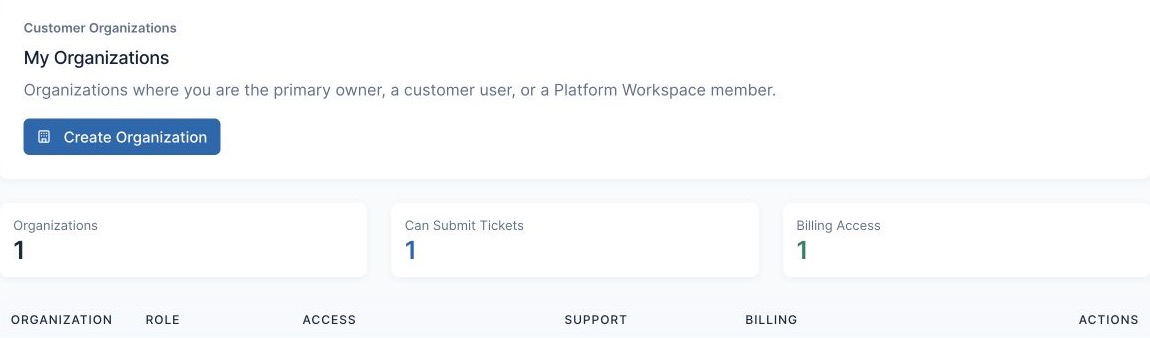
- Open My Organizations.
- Review each organization's role, approval state, ticket permissions, billing access, open ticket count, invoice count, and active subscriptions.
- Select Open Organization to enter the organization command center.
- If the organization does not exist, select Create Organization and submit accurate organization information for review.
- If changes are requested, open the request, address the review note, and submit it again.
What approval and permissions mean
- A pending organization can be reviewed or corrected, but support, billing, and member actions may remain unavailable until approval.
- Ticket viewing, ticket submission, billing, and member management are separate permissions.
- If you belong to several organizations, confirm the organization before opening a ticket or billing record.
Troubleshooting
- If an expected organization is missing, confirm that you signed in with the authorized email address and ask an organization owner or Batoi Support to review the membership.
- If billing is absent, your organization may be pending or your role may not include billing access.
- If the organization information is incorrect, use the available edit action or open an organization support ticket.
Completion check
- The correct organization is open.
- Your displayed role and permissions match the work you need to perform.
- Any pending approval or requested change has a clear next action.
Expected result: You are working in the correct customer organization and understand the support and billing actions available to your account.
Related tasks
Continue to Use Organization Support in My Batoi, Manage Organization Billing in My Batoi, or return to the Account, Support, and Billing guide.