
Guide navigation 9 of 11
Submit a safe, well-scoped support request for the correct customer organization.
Before you begin
- Confirm that the organization owns the affected product, workspace, invoice, payment, or service.
- Review existing organization tickets to avoid reporting the same issue twice.
- Collect authorized evidence, exact timing, impact, expected result, actual result, and troubleshooting already completed.
Open the ticket
- Open Open Organization Ticket.
- Enter a specific subject that names the issue or requested outcome.
- Select the correct organization when the account has access to more than one.
- Choose a priority that reflects the actual operational impact.
- Select the affected product or service when the option is available.
- Choose the general, technical, or billing lane when your organization role permits it. Otherwise, review the lane assigned by the application.
- Use the Markdown description to explain the context, steps, timing, expected result, actual result, impact, and actions already taken.
- If you use Draft with BI, treat the result as a draft. Verify every statement and remove unnecessary information.
- Attach only files that are authorized and necessary to understand the request.
- Review the complete request and select Create Ticket.
Protect sensitive information
Never include passwords, one-time codes, private keys, API keys, access tokens, secret configuration, unrelated customer records, or unnecessary personal information. Redact screenshots and logs before attaching them. A support request does not authorize broader disclosure.
Use priority and lanes carefully
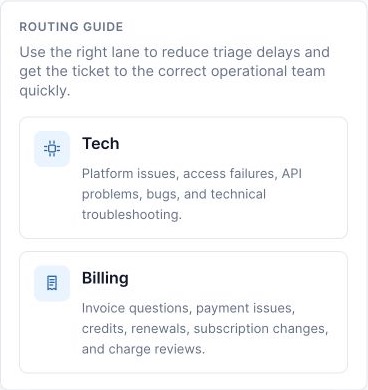
- Use technical support for product errors, access failures, APIs, integrations, and reproducible defects.
- Use billing support for invoices, payments, credits, renewals, subscription changes, or charge questions.
- Use general support when neither specialized lane is appropriate.
- Do not mark a request urgent solely to accelerate a normal request.
Completion check
- The ticket has a generated number and belongs to the intended organization.
- The subject, priority, lane, and description accurately represent the request.
- Attachments contain no secrets or unauthorized records.
- The ticket appears in Organization Tickets for follow-up.
Expected result: A traceable organization support ticket contains sufficient safe context for review and follow-up.
Related tasks
Continue to Review and Manage Organization Support Tickets, use Troubleshoot a Batoi Workspace Task, or return to the Account, Support, and Billing guide.