
Guide navigation 17 of 42
What this page helps you accomplish
Plan and record evidence that links a Build change to source, review, publish, deployment, Guard, approval, and controlled sharing.
Scope and authority
A defined obligation, control, release, approval, assessment, or member-facing decision Access to the relevant source, review, publish, deployment, and Guard facts
Evidence Management
Plan and record evidence that links a Build change to source, review, publish, deployment, Guard, approval, and controlled sharing.
Observable business result
Reviewers can trace the Build change from source through deployment and assurance, identify open evidence work, and distinguish Recorded, Review, and Accepted states.
The expected record or action is missing.
Recommended recovery: Return to the intended context and ask an Owner or Admin to confirm access. Do not use another person’s account.Who should use this article
This article is for Assurance Lead, Release Owners, and Reviewers who are authorized to complete or review this task. A consequential decision remains with the accountable person.
Before you begin
- A defined obligation, control, release, approval, assessment, or member-facing decision
- Access to the relevant source, review, publish, deployment, and Guard facts
- Authority to assign evidence owners and acceptance criteria
- Use approved sample or operational information only. Never enter a password, token, private key, or unnecessary personal information.
Understand the evidence chain
Plan the required evidence
- Identify the obligation, control, release, approval, assessment, or member-facing decision that needs support.
- Define each evidence item, source system, accountable owner, review period, due date, and acceptance condition.
- Separate execution evidence from deployment verification so reviewers can distinguish what changed from what ran.
- Include the Guard result and any authorized exception.
- Define sensitivity, access, retention, and refresh rules before attaching files or detailed records.
Record Build evidence
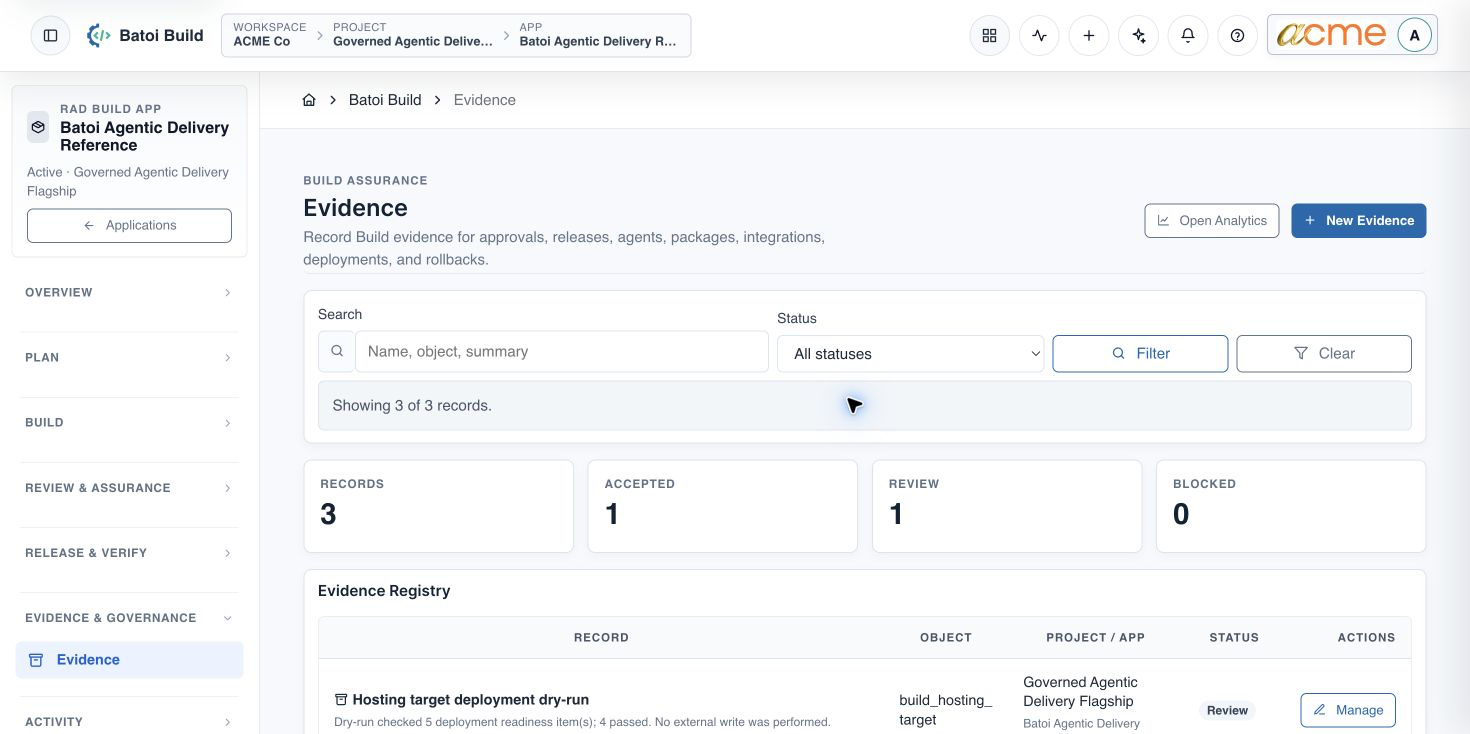
- In the selected app, open Evidence & Governance and choose Evidence.
- Create or update the execution evidence with the reviewed revision, validation, schema outcome, and agent or human review facts.
- Create or update deployment verification with the target, terminal deployment status, route checks, adapter checks, and Guard result.
- Use Recorded for captured evidence, Review while assessment remains open, and Accepted only after authorized review.
Completion check
- Evidence identifies the selected project, app, release, environment, and accountable owner.
- Source, review, publish, deployment, Guard, and approval facts can be traced without relying on a narrative claim alone.
- Items in Review have an owner and next action.
- Accepted evidence reflects an authorized review.
- No credential, private connection detail, local path, or unnecessary personal information is copied into the record.
If an approved member view is required, continue with Configure Member-Safe Project Sharing.
Troubleshooting and recovery
| What you see | What to check | Safe next action |
|---|---|---|
| The expected record or action is missing. | Workspace, project/app context, role, status filters, and prerequisites. | Return to the intended context and ask an Owner or Admin to confirm access. Do not use another person’s account. |
| The status remains incomplete or needs review. | Required fields, evidence, approvals, source connections, checks, and owners. | Record the missing item and owner. Do not mark the task complete until it can be independently verified. |
| The result conflicts with policy or evidence. | Scope, source recency, exception authority, decision conditions, and reviewer independence. | Do not bypass the control. Return the item for correction or escalate it through the authorized route. |
Safety and governance
Final verification
Next step
Continue with the next verified article in this Product Guide, or return to the Batoi Platform Product Guide.