
Guide navigation 19 of 44
What this page helps you accomplish
Connect assessment evidence, feedback, completion conditions, and authorized progression decisions.
Scope and authority
Access to the appropriate authenticated workspace through My Batoi Authority for the records, action, or decision involved
Assessment
Connect assessment evidence, feedback, completion conditions, and authorized progression decisions.
Observable business result
The assessment and progression record is supported, attributable, and communicated through the approved process.
A result is disputed, incomplete, or inconsistent with the grading scheme.
Recommended recovery: Hold the progression decision, review evidence and moderation, correct through the authorized process, and preserve the reason and reviewer.Who should use this article
This article is for academic reviewers who are authorized to complete or review the task in the intended workspace. The person making a consequential operational, commercial, academic, care, access, or compliance decision remains accountable for the result.
Before you begin
- Access to the appropriate authenticated workspace through My Batoi
- Authority for the records, action, or decision involved
- Use a sanitized demonstration record for practice and confirm the intended workspace, role, scope, and responsible owner before changing operational records.
- Do not place passwords, connection secrets, personal data, regulated information, private documents, or payment details in notes, prompts, screenshots, or exports.
Workflow overview
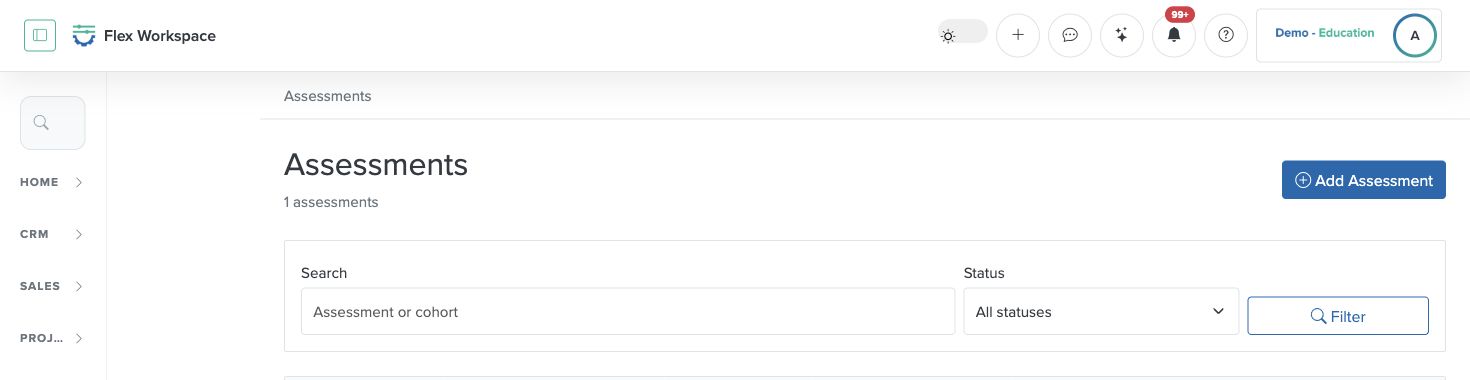
Complete the workflow
- Confirm the workspace and responsibility. Enter the authorized workspace through My Batoi. Confirm the workspace name, your current role, the record or review period, and the person accountable for the result.
- Open the current product area. Open Education and Assessments and Results. Confirm the programme, class or cohort, subject, assessment, grading scheme, and authorized reviewer.
- Check prerequisites and source records. Make sure the required capability, connection, status, relationship, approval, and safe information boundary are ready. Search before creating a new record.
- Perform the task. Review submitted or recorded results, apply the approved grading scheme, complete moderation, and prepare the supported progression or completion decision.
- Review the result. Check assessment scope, evidence, marks or outcomes, moderation, exceptions, academic authority, communication, report cards, and certificate conditions.
- Verify and retain the outcome. The final result and progression state are supported by reviewed evidence and visible only to the intended authorized audience. Record every exception and follow-up with an owner and review date.
Verify the result
- The workspace, role, record, period, and Industry Pack still match the intended scope.
- The assessment and progression record is supported, attributable, and communicated through the approved process.
- The visible status, source evidence, owner, exception, and next action agree with the completed work.
- An authorized reviewer can understand the result without relying on hidden assumptions or information outside Flex.
Troubleshooting and recovery
| What you see | What to check | Safe next action |
|---|---|---|
| A result is disputed, incomplete, or inconsistent with the grading scheme. | Workspace, role, entitlement, source record, status, ownership, required fields, and approval evidence. | Hold the progression decision, review evidence and moderation, correct through the authorized process, and preserve the reason and reviewer. |
| The expected page or action is missing. | Current role, team scope, Industry Pack availability, workspace subscription, record state, and prerequisite setup. | Stop and ask an authorized Owner or Admin to review access. Do not use another person’s account or bypass the control. |
| The result conflicts with evidence or another register. | Source ownership, date range, status definitions, duplicate records, latest update, and correction history. | Do not mark the task complete. Return it for correction or escalate it to the accountable owner. |
Safety and governance
Do not copy authenticated page addresses, record identifiers, connection details, browser notifications, account information, or unrelated workspace content into public documentation or external communication.
Use Batoi Intelligence safely
Next step
Continue with the next verified article in this Product Guide, or return to the Batoi Flex Product Guide.