
Guide navigation 21 of 44
What this page helps you accomplish
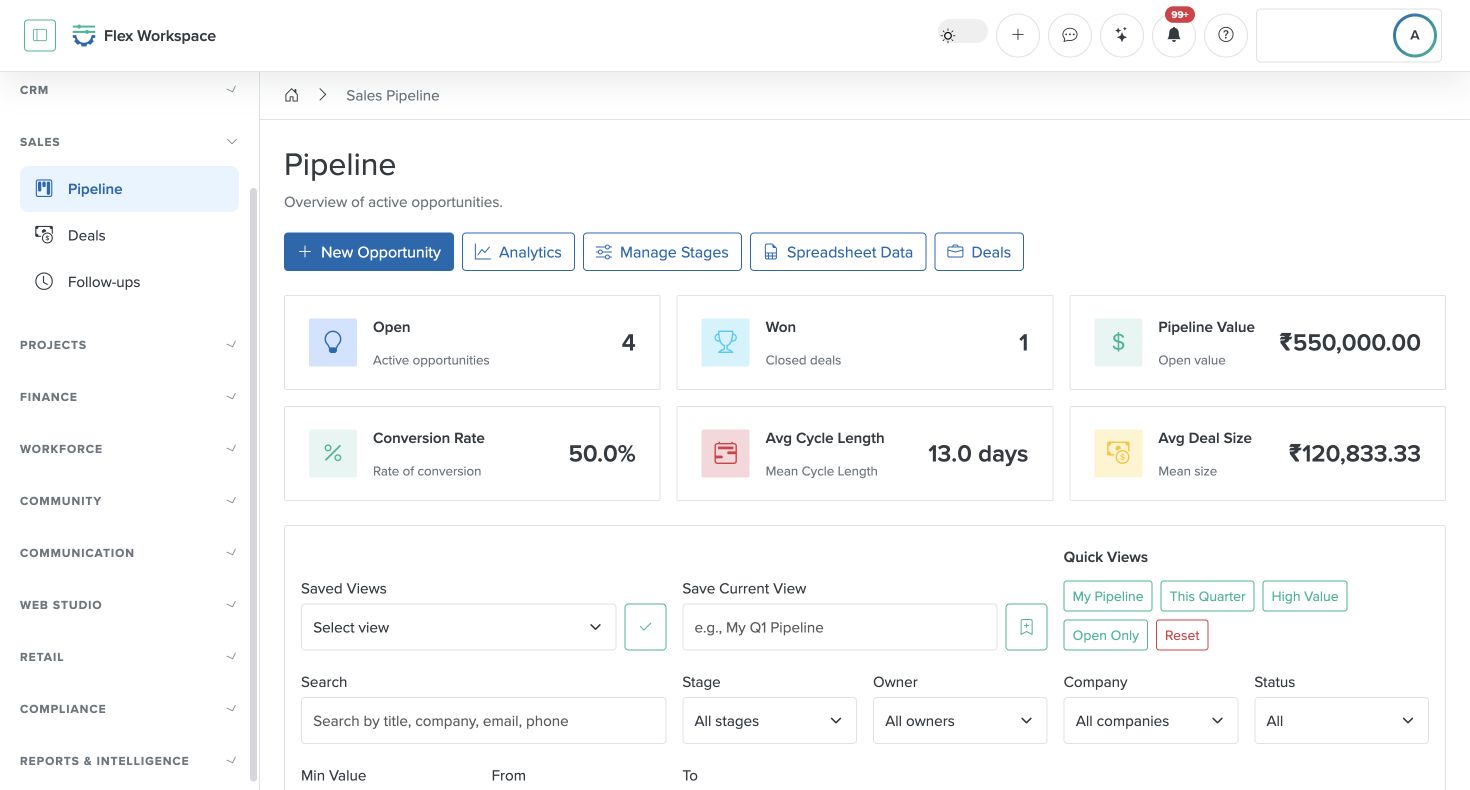
This guide explains the Batoi Flex sales cycle as a complete, connected workflow. It is written for end users who want to understand how to capture interest, qualify prospects, track opportunities, close deals, and maintain momentum through follow-ups. The flow is anchored in the left sidebar navigation so users can instantly map the steps to what they see in the product.
Scope and authority
Access to the intended Batoi Flex workspace and the relevant capability Authority to complete or review the documented task
Operations
This guide explains the Batoi Flex sales cycle as a complete, connected workflow. It is written for end users who want to understand how to capture interest, qualify prospects, track opportunities, close deals, and maintain momentum through follow-ups. The flow is anchored in the left sidebar navigation so users can instantly map the steps to what they see in the product.
Observable business result
This guide explains the Batoi Flex sales cycle as a complete, connected workflow. It is written for end users who want to understand how to capture interest, qualify prospects, track opportunities, close deals, and maintain momentum through follow-ups. The flow is anchored in the left sidebar navigation so users can instantly map the steps to what they see in the product.
A deal is marked won but delivery or billing context is missing.
Recommended recovery: Correct the stage, create the approved handoff, reconcile scope and commercial evidence, and assign an owner before recognizing completion.Who should use this article
This article is for Operators who are authorized to complete or review the task in the intended workspace. The person making a consequential operational, commercial, academic, care, access, or compliance decision remains accountable for the result.
Before you begin
- Access to the intended Batoi Flex workspace and the relevant capability
- Authority to complete or review the documented task
- Use a sanitized demonstration record for practice and confirm the intended workspace, role, scope, and responsible owner before changing operational records.
- Do not place passwords, connection secrets, personal data, regulated information, private documents, or payment details in notes, prompts, screenshots, or exports.
Workflow overview
Complete the workflow
- Confirm the workspace and responsibility. Enter the authorized workspace through My Batoi. Confirm the workspace name, your current role, the record or review period, and the person accountable for the result.
- Open the current product area. Begin in CRM with the canonical relationship record and the current opportunity. Confirm owner, qualification, scope, commercial assumptions, and next decision.
- Check prerequisites and source records. Make sure the required capability, connection, status, relationship, approval, and safe information boundary are ready. Search before creating a new record.
- Perform the task. Progress evidence-supported stages, prepare the proposal, create the delivery engagement after approval, record work, generate billing, and reconcile payment.
- Review the result. Check every handoff between CRM, Projects or Professional Services, Billing, and Payments for scope, ownership, amount, dates, and retained evidence.
- Verify and retain the outcome. Won work has a delivery owner and approved commercial basis, and closed revenue agrees with the issued invoice and verified payment. Record every exception and follow-up with an owner and review date.
Verify the result
- The workspace, role, record, period, and Industry Pack still match the intended scope.
- This guide explains the Batoi Flex sales cycle as a complete, connected workflow. It is written for end users who want to understand how to capture interest, qualify prospects, track opportunities, close deals, and maintain momentum through follow-ups. The flow is anchored in the left sidebar navigation so users can instantly map the steps to what they see in the product.
- The visible status, source evidence, owner, exception, and next action agree with the completed work.
- An authorized reviewer can understand the result without relying on hidden assumptions or information outside Flex.
Troubleshooting and recovery
| What you see | What to check | Safe next action |
|---|---|---|
| A deal is marked won but delivery or billing context is missing. | Workspace, role, entitlement, source record, status, ownership, required fields, and approval evidence. | Correct the stage, create the approved handoff, reconcile scope and commercial evidence, and assign an owner before recognizing completion. |
| The expected page or action is missing. | Current role, team scope, Industry Pack availability, workspace subscription, record state, and prerequisite setup. | Stop and ask an authorized Owner or Admin to review access. Do not use another person’s account or bypass the control. |
| The result conflicts with evidence or another register. | Source ownership, date range, status definitions, duplicate records, latest update, and correction history. | Do not mark the task complete. Return it for correction or escalate it to the accountable owner. |
Safety and governance
Do not copy authenticated page addresses, record identifiers, connection details, browser notifications, account information, or unrelated workspace content into public documentation or external communication.
Use Batoi Intelligence safely
Next step
Continue with the next verified article in this Product Guide, or return to the Batoi Flex Product Guide.