
Guide navigation 28 of 42
What this page helps you accomplish
Learn how to open Batoi Learn, choose a practical lab, and follow a guided learning path from understanding to workplace application.
Scope and authority
Access to Batoi Learn through the intended authenticated workspace A learning objective or assigned capability to guide the first activity
Getting Started
Learn how to open Batoi Learn, choose a practical lab, and follow a guided learning path from understanding to workplace application.
Observable business result
Open Batoi Learn, choose a suitable practical Lab, and understand how its guided stages produce work that a reviewer can assess.
The expected record or action is missing.
Recommended recovery: Return to the intended context and ask an Owner or Admin to confirm access. Do not use another person’s account.Batoi Learn turns practical workplace scenarios into guided learning paths. You can study a concept, practise it in a safe lab, receive an automatic assessment, and carry the result into your work.
Who should use this article
This article is for Learners who are authorized to complete or review this task. A consequential decision remains with the accountable person.
Before you begin
- Access to the intended Batoi workspace and the role required for the task
- An approved purpose, accountable owner, and safe information boundary
- The source records or sample information needed to verify the result
- Use approved sample or operational information only. Never enter a password, token, private key, or unnecessary personal information.
Who can use Batoi Learn
Batoi Learn is available inside a workspace to Owners, Admins, Operators, Builders, Analysts, and Viewers. Viewers have read-only access. Workspace Members do not have access to Learn.
Open Learn and choose a lab
- Sign in and open the workspace where you want to learn.
- Open Learn from the workspace navigation.
- Choose a learning path, assignment, or one of the available labs.
Available labs span AI practice, strategy, and assurance:
- AI Adoption Planner — identify a suitable AI opportunity and turn it into a responsible adoption plan.
- AI Governance & Compliance Lab — examine obligations, risks, controls, evidence, accountability, and decision readiness.
- Applied ML Lab — configure and evaluate a safely limited machine-learning experiment.
- AI Response Lab — improve AI responses with structured criteria, comparison, and reflection.
- SaaS Strategy Lab — connect customer value, packaging, pricing reasoning, evidence, and decision criteria.
- Cloud Strategy and Sustainability Lab — evaluate architecture, region, cost, resilience, responsibility, and review conditions.
- Governance Assurance Lab — map obligations, controls, evidence requests, findings, and accountable assurance decisions.
- Security Assurance Lab — interpret security evidence and prepare proportionate findings, treatment, and release recommendations.
- Operations Readiness Lab — assess operating ownership, support, continuity, incidents, gaps, fallback, and readiness conditions.
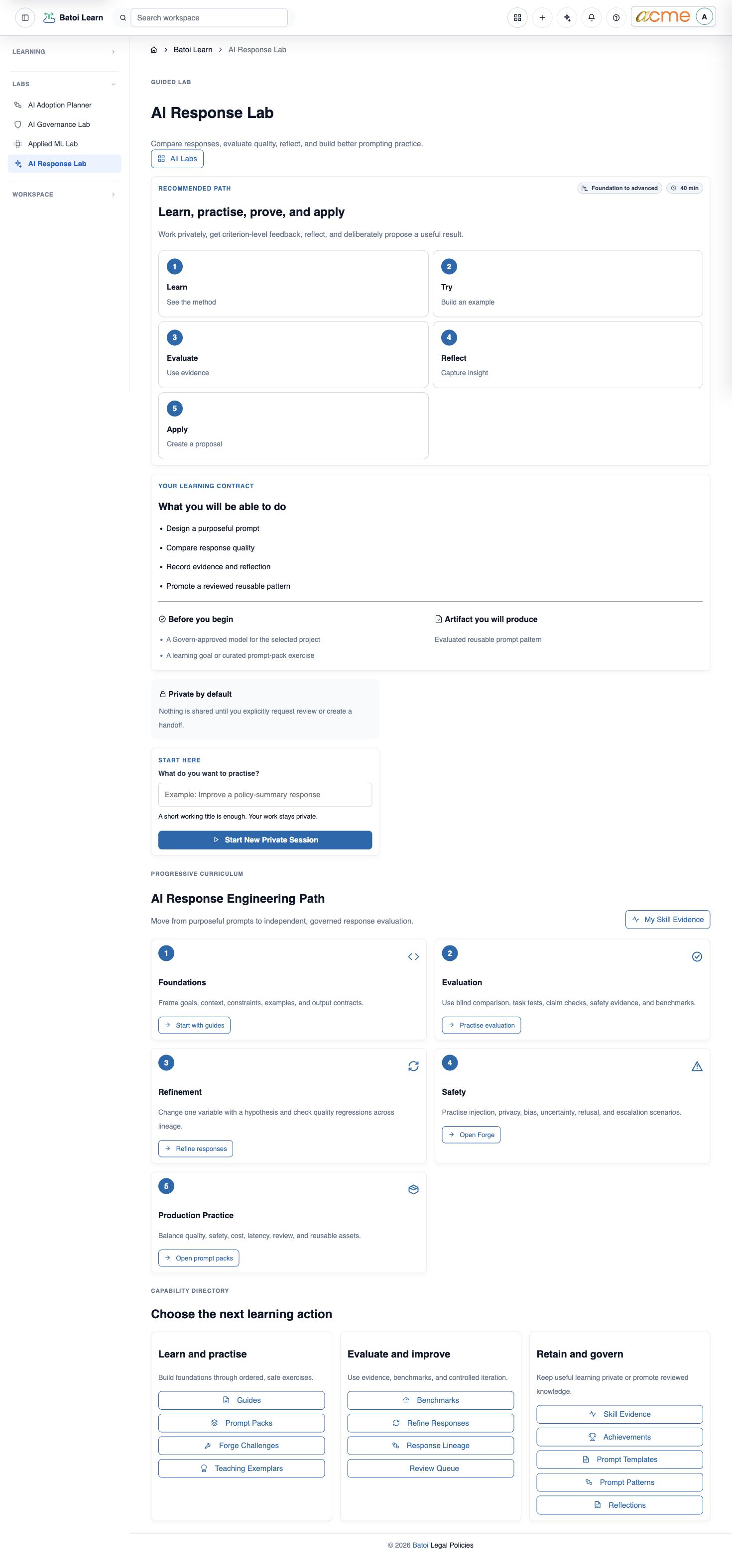
Follow the guided stages
Start with the first available stage and use the primary action to continue. A path normally moves through Learn, Try, Evaluate, Reflect, and Apply. Complete each stage in order so your evidence and progress remain connected.
What happens next
When you submit assessable work, Learn scores it automatically and shows criterion-level feedback. You can improve the work, reflect on the result, and complete the application step. Your completed evidence contributes to your private mastery portfolio.
For the four core AI labs, continue with Complete AI Labs and Hand Off Reviewed Work. It explains the exact AI Adoption Planner, AI Governance & Compliance, Applied ML, and AI Response workflows and the human-review boundary for Govern and Build proposals.
Troubleshooting and recovery
| What you see | What to check | Safe next action |
|---|---|---|
| The expected record or action is missing. | Workspace, project/app context, role, status filters, and prerequisites. | Return to the intended context and ask an Owner or Admin to confirm access. Do not use another person’s account. |
| The status remains incomplete or needs review. | Required fields, evidence, approvals, source connections, checks, and owners. | Record the missing item and owner. Do not mark the task complete until it can be independently verified. |
| The result conflicts with policy or evidence. | Scope, source recency, exception authority, decision conditions, and reviewer independence. | Do not bypass the control. Return the item for correction or escalate it through the authorized route. |
Safety and governance
Final verification
Next step
Continue with the next verified article in this Product Guide, or return to the Batoi Platform Product Guide.