
Guide navigation 26 of 42
What this page helps you accomplish
Turn release-specific Guard findings and policy thresholds into an explicit pass, block, or authorized exception.
Scope and authority
A selected app and release with current Guard checks and findings Authority to define blocking thresholds and decide or escalate exceptions
Policy Management
Turn release-specific Guard findings and policy thresholds into an explicit pass, block, or authorized exception.
Observable business result
The release gate enforces reviewed conditions, stops unsafe promotion, and preserves the evaluated result and any authorized exception.
The expected record or action is missing.
Recommended recovery: Return to the intended context and ask an Owner or Admin to confirm access. Do not use another person’s account.Who should use this article
This article is for Security Owner, Release Owners, and Reviewers who are authorized to complete or review this task. A consequential decision remains with the accountable person.
Before you begin
- A selected app and release with current Guard checks and findings
- Authority to define blocking thresholds and decide or escalate exceptions
- An evidence owner for the release result
- Use approved sample or operational information only. Never enter a password, token, private key, or unnecessary personal information.
Open Guard review and the gate
- Open the selected app in Build.
- Expand Review & Assurance and choose Guard Checks & Findings.
- Review the relevant findings, then open Guard Gate.
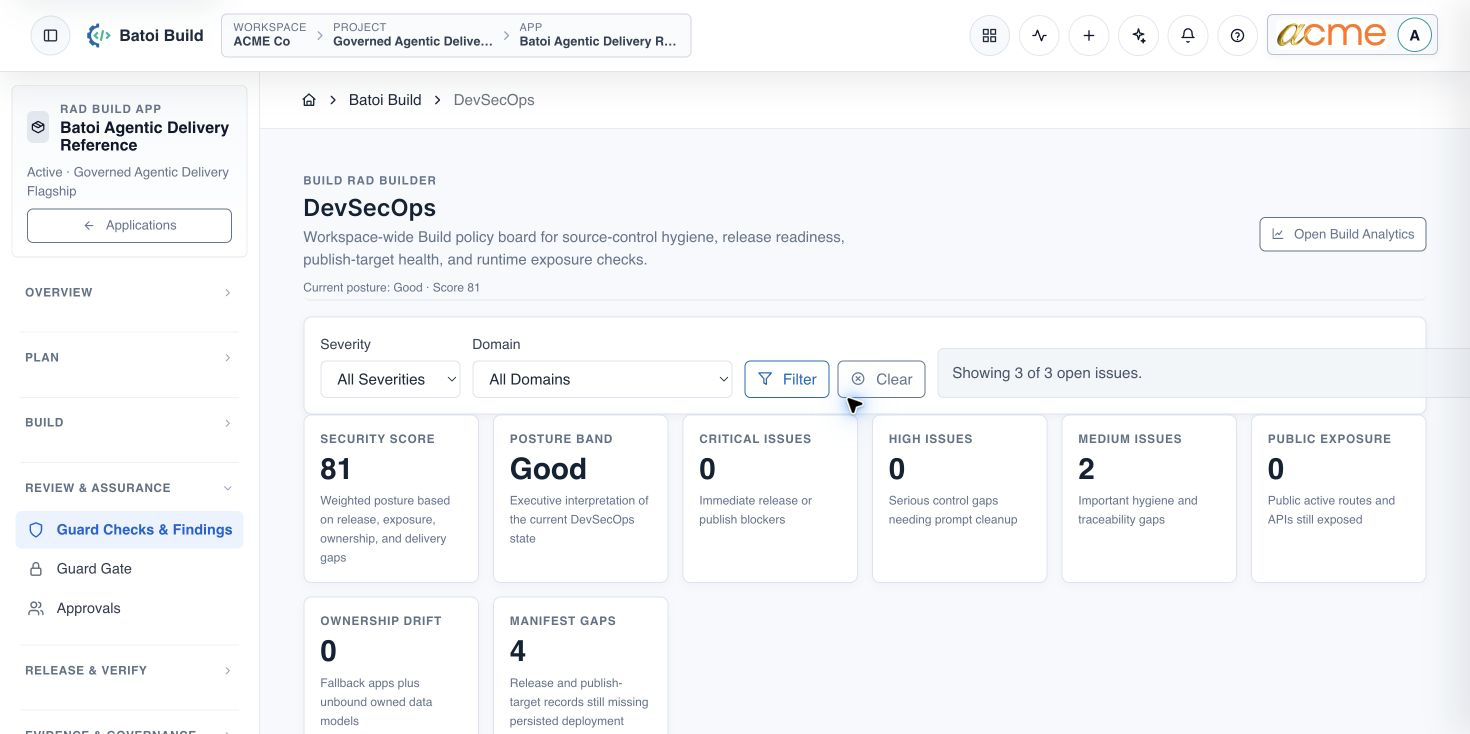
Review the current posture
- Filter checks and findings to the relevant application, repository, release, environment, and severity.
- Confirm Critical and High findings are resolved or explicitly blocked.
- Review Medium findings that affect traceability, pipeline ownership, deployment manifests, or architecture.
- Separate workspace-wide posture from the release-specific result. A good workspace score does not automatically approve this release.
Configure and apply the gate
- Bind the gate to the selected app and release object.
- Define required checks, blocking thresholds, evidence freshness, and accountable owner.
- Require a blocking result for unmet release conditions.
- Define the exception authority, reason, expiry, compensating action, and follow-up evidence.
- Run the release-specific evaluation and record Passed, Failed, or Waived only from the evaluated outcome.
Completion check
- The gate is scoped to the intended app, release, and environment.
- Critical and High release blockers are absent or stop promotion.
- Medium app-relevant findings have an owner and due action.
- Any exception is authorized, time-bounded, justified, and preserved as evidence.
- The result is linked to the deployment and governance evidence.
Troubleshooting and recovery
| What you see | What to check | Safe next action |
|---|---|---|
| The expected record or action is missing. | Workspace, project/app context, role, status filters, and prerequisites. | Return to the intended context and ask an Owner or Admin to confirm access. Do not use another person’s account. |
| The status remains incomplete or needs review. | Required fields, evidence, approvals, source connections, checks, and owners. | Record the missing item and owner. Do not mark the task complete until it can be independently verified. |
| The result conflicts with policy or evidence. | Scope, source recency, exception authority, decision conditions, and reviewer independence. | Do not bypass the control. Return the item for correction or escalate it through the authorized route. |
Safety and governance
Final verification
Next step
Continue with the next verified article in this Product Guide, or return to the Batoi Platform Product Guide.