Developers Blog
Using Distraction Free Full Screen Editor in WordPress
This article explains how to use a distraction free full screen editor in WordPress by using a full screen editor that gives a clutter free writing environment.

While WordPress comes with a powerful and feature rich visual and text editor, at times you might want to use a full screen editor that gives you a clutter free writing environment by hiding unnecessary menus and boxes from the screen. In this article, we will guide you how to use a distraction free full screen editor in WordPress.
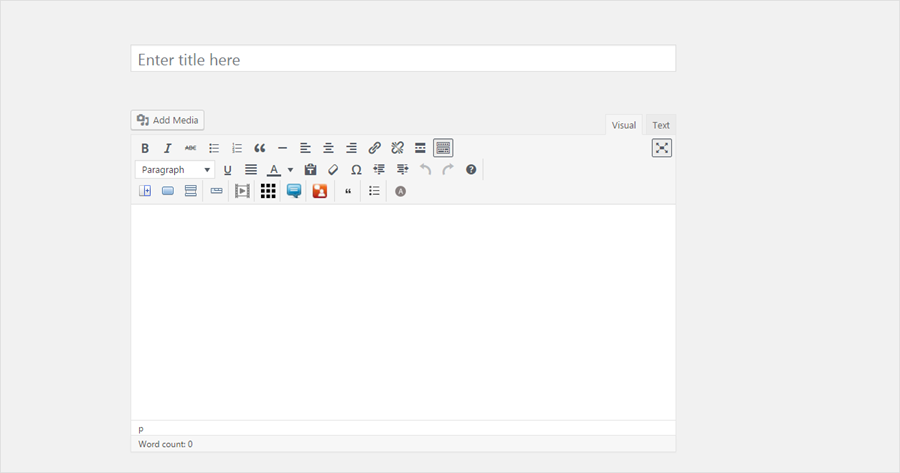
When you are on the 'Add New Post' screen, to launch the full screen editor, click on the full screen button in WordPress editor as shown in Figure 1.

Upon doing so, WordPress will convert the post edit screen into a clutter free full screen editor as shown in Figure 2.
The full screen editor has a minimalist layout. It has a menu bar on top of the screen with very few buttons. The menu bar only appears when you take the mouse to the top of the screen. Just like regular post edit screen, full screen editor is also available in both visual and text editor.
While the visual editor in full screen mode shows all the buttons and will work just like they worked in the default edit screen, switching to text editor will show just a few of those buttons as shown in Figure 3.

Note: The Full screen editor does not have a Publish button, or any meta boxes to choose categories and tags. After writing your post, you can exit full screen to select your post options.