A Practical Guide for Governed AI-Assisted Work
Business software has become rich in features, but daily work often begins with a simple question. Which leads need attention today? Which invoices are overdue? Which projects are slipping? Which website inquiries deserve a response before the day ends?
Traditionally, a user answers these questions by moving through several application screens, filters, tables, exports, and notes. That works, but it is not always the fastest route to a decision. With the Batoi Flex connector for Claude, users can ask such questions in plain language and receive structured answers from their connected Flex workspace.
It does not make Claude a replacement for Batoi Flex. Flex remains the governed operating system for the business. Claude becomes an assisted work surface: a place to ask, inspect, summarize, draft, and prepare actions using Flex data accessed through approved tools.
What It Means to Use Batoi Flex From Within Claude
Using Batoi Flex from within Claude means that Claude can securely call approved Flex tools for a connected workspace. The user may ask a question such as:
Using Batoi Flex, list open CRM leads due today and show the next action for each.
Claude interprets the request, invokes the Batoi Flex connector when required, retrieves the relevant records, and presents the result in a format the user can act on. The answer may be a summary, a table, a priority list, a draft follow-up message, or a management brief.
The important distinction is architectural. The business records remain in Batoi Flex. Claude does not become the record-keeping system. It helps the user work with records that continue to be governed inside Flex.
This distinction is consistent with Batoi’s platform direction: Batoi is positioned as a governed platform where applications, AI systems, and compliance posture are managed through identity, access, policy, audit, API, and AI services rather than loosely stitched systems.
Why This Is Useful
Most teams do not suffer from a lack of data. They suffer from friction between data and action.
A sales user wants to know which leads need follow-up. A delivery manager wants to know which projects are at risk. A finance user wants a quick view of overdue invoices. A business owner wants a daily brief across sales, projects, finance, and website inquiries.
Batoi Flex already contains the operational records. Claude makes it easier to ask business questions over those records without forcing the user to begin with menu navigation. It is useful when the user needs an answer, a draft, a ranking, or a brief rather than a full application workflow.
A practical use case is a morning work review. The user can ask Claude to retrieve open CRM leads, tasks due this week, overdue invoices, and recent form submissions. Claude can then organize the result as a short executive summary followed by a table. The user can inspect the output and open Batoi Flex for formal review or action.
It is where conversational AI becomes operationally useful: not as an independent decision-maker, but as a disciplined assistant working over governed business data.
Good Use Cases
Batoi Flex can expose several business areas through approved connector tools. The most immediate use cases are CRM, Projects, Finance, and Web Presence.
In CRM, Claude can help users identify open leads, overdue next actions, event-sourced leads, high-priority opportunities, and stale records. It can also prepare follow-up drafts based on existing lead details. It is especially useful for sales teams that need a daily action list rather than a raw lead dump.
In Projects, Claude can summarize active projects, tasks due soon, overdue work, client-specific project status, and delivery risks. It helps delivery teams prepare for review meetings without manually assembling project notes first.
In Finance, Claude can summarize recent invoices, overdue invoices, invoice aging, payment follow-up needs, and collection risks. Finance teams can use this to prepare internal review notes or customer reminders, with final verification still done in Flex.
In Web Presence, Claude can review bookings, catalog items, form submissions, and website inquiries. It helps teams triage incoming interest and prepare timely responses.
The strongest use case is the cross-functional daily brief. A user can ask:
Using Batoi Flex, prepare my daily workspace brief with CRM leads due today, project tasks due soon, overdue invoices, and recent form submissions.
The result can become the user’s operating brief for the day.
Governance Comes Before Automation
The value of Claude inside Batoi Flex depends on governance. Without governance, conversational access to business records can become risky. With governance, it becomes a controlled and auditable productivity layer
Access should be governed at the workspace level. Owners and Admins should decide which workspace areas Claude may access, which tool groups are enabled, whether write tools are permitted, and who can connect Claude to Flex.
The recommended starting posture is read-only access. Read-only tools allow Claude to retrieve and summarize records without changing business data. It is sufficient for most early use cases: daily briefs, lead prioritization, project summaries, invoice review, and inquiry triage.
Write access should be enabled only after the workspace Owner or Admin approves the workflow. Even then, the user should review Claude’s proposed tool call before approving it. The user should verify the target record, UID, action, values, and workspace.
The guiding principle is least privilege. Claude should have enough access to help the user complete the intended task, but not more than the workflow requires.
This approach aligns with Batoi’s broader product architecture. Batoi Core provides the platform foundation for identity, access, policy, audit, API, AI services, projects, files, messages, pages, and reports; these capabilities support governed operations across the portfolio.
Read-Only First, Write Access Later
The safest way to begin is simple: connect Claude to Batoi Flex with read-only access and use it for retrieval, summaries, prioritization, and drafts.
A read-only prompt may look like this:
Using Batoi Flex, list open CRM leads due today and show name, status, stage, source, next action, and next action date.
It gives the user a useful working view without changing any records.
Write prompts require more discipline. The prompt should identify the exact target record, preferably by UID. It should clearly state the intended action and value.
A safe write prompt may look like this:
Using Batoi Flex, add this note to contact UID [contact_uid]: Discussed pricing and asked for a proposal by Friday.
A weak write prompt looks like this:
Using Batoi Flex, update the lead.
The second prompt is unsafe because it does not identify the target record or the exact update. Claude may ask for clarification, but the user should not depend on ambiguity handling for business records. UID-based prompts reduce risk.
Setup Workflow
The setup workflow has two sides: Flex administration and Claude user connection.
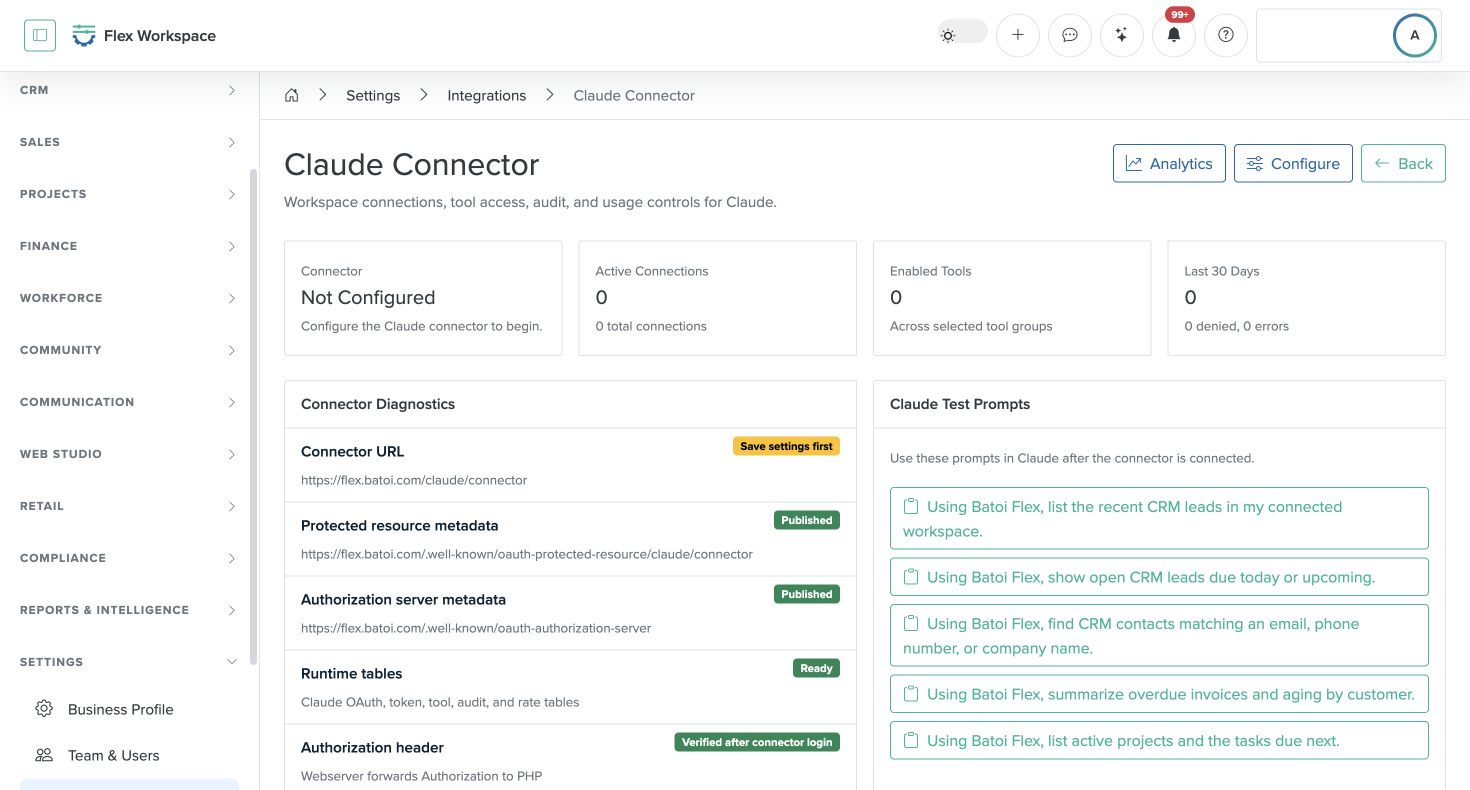
In Batoi Flex, an Owner or Admin opens the Claude Connector integration, configures the connector, confirms the connector name and connector URL, selects the required tool groups, keeps write tools disabled unless approved, saves the settings, and runs a test setup.
In Claude, the user opens connector settings, adds a custom connector named Batoi Flex, enters the Flex connector URL, follows the connection flow, selects the intended Flex workspace, and begins with a read-only test prompt.
A good first test is:
Using Batoi Flex, tell me which workspace you are connected to and what Flex areas are available.
It confirms the workspace, available areas, and connector readiness before the user asks for business data.
How to Prompt Claude Well
Good prompts are specific. They name the system, the workspace area, the filter, and the expected output format.
The reusable pattern is:
Using Batoi Flex, [action] [workspace area] [filter/timeframe] and show [fields/output format].
The phrase “Using Batoi Flex” is important because it makes the connector intent explicit. It helps Claude understand that the answer should come from the connected Flex workspace rather than from general reasoning
A strong CRM prompt is:
Using Batoi Flex, list open CRM leads due today and show name, status, stage, source, next action, and next action date.
A strong finance prompt is:
Using Batoi Flex, show overdue invoices and group them by customer, with amount, due date, and payment status.
A strong project prompt is:
Using Batoi Flex, list tasks due in the next 7 days and group them by project.
A strong management prompt is:
Using Batoi Flex, return the result as a short executive summary followed by a table of records needing action.
The better the prompt, the better the result. Specific fields reduce guesswork. Timeframes reduce noise. Output format instructions make the response easier to use.
Reviewing Claude’s Results
Claude may summarize, rank, and reformat Flex data. It is an assisted analysis. Important business actions still require review.
When the result matters, users should check record names, UIDs, statuses, dates, and source fields. If a final decision is required, the user should open the record in Batoi Flex and verify it there.
For auditability, the user can ask Claude to include source fields. For updates, the user should use UIDs. For summaries, the user should request the exact columns needed.
A useful review prompt is:
Using Batoi Flex, repeat the result and include UID, status, stage, source, and next action date where available.
It turns a loose summary into an inspectable working view.
Operating Guidelines for Teams
Owners should define approved use cases before broad rollout. Admins should monitor active connections and periodically review access. Sales users should use Claude for lead prioritization, meeting preparation, and follow-up drafting. Delivery users should use it for project and task status review. Finance users should use it for invoice summaries and for preparing payment follow-up. Content and presence users should use it for bookings, catalog review, and form-submission response planning.
For Viewers, read-only prompts are usually enough. When access changes are needed, the request should go through an Admin.
This operating model keeps Claude useful without making access informal.
Prompt Library - A Reference
Daily Brief
Use this when a user wants a management view of the day.
Using Batoi Flex, prepare my daily workspace brief with CRM leads due today, project tasks due soon, overdue invoices, and recent form submissions.
Using Batoi Flex, identify the top 10 items needing attention today and separate them by CRM, Projects, Finance, and Web Presence.
Using Batoi Flex, return the result as a short executive summary followed by a table.
CRM
Use this for sales follow-up, lead inspection, and pipeline review.
Using Batoi Flex, list open CRM leads and show name, interest, status, stage, source, and next action date.
Using Batoi Flex, find CRM leads where the next action date is overdue.
Using Batoi Flex, create a follow-up priority list from open leads and explain why each one matters.
Using Batoi Flex, review lead UID [lead_uid] and suggest a professional follow-up message.
Projects
Use this for delivery review and for preparing client updates.
Using Batoi Flex, list active projects and show project title, client, status, priority, and due date.
Using Batoi Flex, list tasks due in the next 7 days and group them by project.
Using Batoi Flex, review project UID [project_uid] and identify the next operational actions.
Using Batoi Flex, summarize project UID [project_uid] for a client update email.
Finance
Use this for invoice review, payment follow-up, and collection planning.
Using Batoi Flex, show overdue invoices and group them by customer.
Using Batoi Flex, summarize invoice aging for this workspace.
Using Batoi Flex, list unpaid invoices over [amount].
Using Batoi Flex, review invoice UID [invoice_uid] and draft a polite payment reminder.
Web Presence
Use this for bookings, catalog review, and form-submission triage.
Using Batoi Flex, list recent bookings and show customer, date, status, and service.
Using Batoi Flex, show form submissions that need a response.
Using Batoi Flex, summarize recent website inquiries and group them by topic.
Using Batoi Flex, identify urgent form submissions from the last 7 days.
Safe Write Prompts
Use these only when write tools are enabled and approved.
Using Batoi Flex, add this note to contact UID [contact_uid]: [note text].
Using Batoi Flex, update lead UID [lead_uid] to status [status] and stage [stage].
Using Batoi Flex, create a task titled “[task title]” for project UID [project_uid] due on [date].
Using Batoi Flex, record a payment of [amount] [currency] for invoice UID [invoice_uid] paid on [date].
Troubleshooting
Use these when Claude does not use the connector or when results need narrowing.
Use the Batoi Flex connector for this request. List recent CRM leads in my connected workspace.
Using Batoi Flex, narrow the result to active CRM leads due in the next 7 days.
Using Batoi Flex, first list matching records with their UIDs, then ask me which one to inspect.
Using Batoi Flex, limit the result to 10 records and rank them by urgency.
You may download a companion cheatsheet asset in PDF here - Batoi Flex in Claude: Prompt Library Cheat Sheet.
Closing
Conversational AI becomes valuable in business when it works with governed systems rather than outside them. Batoi Flex provides the operational record, access controls, and auditability. Claude provides the natural-language work surface.
Together, they let users ask better questions of their business data, prepare faster summaries, reduce routine navigation, and move from scattered records to focused action. The right model is not uncontrolled automation. The right model is governed assistance: read first, verify carefully, write only with approval, and keep Batoi Flex as the source of truth.