
 Batoi Corporate Office
Sales teams need speed, discipline, and traceability. A deal can move forward quickly only when the next step is visible, the right person is notified, and supporting documents are prepared without unnecessary manual effort. At the same time, sales, finance, and management teams need to retain control over decisions that affect customers, revenue, documents, and payments.
Batoi Flex now supports the first release of Sales Process Automation, designed to help teams move from sales activity to revenue operations with clearer recommendations, timely notifications, and editable draft outputs.
This release follows a human-approved automation model. Flex can recommend the next action, explain why the recommendation is made, notify the responsible team members, and prepare an editable invoice draft. Users remain responsible for approving business actions, such as moving a deal, sending an invoice, changing a payment status, or altering a document status.
Why This Matters
Sales work often breaks down in small handoff gaps. A deal may have value but no quotation. A quotation may be accepted, but the sales phase may not reflect that progress. An agreement may be signed, but the finance team may still need a prompt to prepare an invoice. A follow-up may be overdue but not visible at the right moment.
These gaps are common in daily work. They are not always large process failures, but they slow teams down and reduce follow-through.
Sales Process Automation in Batoi Flex addresses these gaps by combining structured CRM signals, billing readiness, agreement activity, and Batoi Intelligence-assisted explanations. The goal is not to replace users. The goal is to help users see what to review next.
What Flex Can Do Now
The first release includes:
- Sales recommendations based on deal and pipeline signals.
- Recommendation cards with accept, snooze, dismiss, and explanation support.
- Agreement-signed invoice readiness notifications.
- Editable draft invoice preparation from deal or quotation data.
- Sales Automation settings for workspace administrators.
- Rule management for enabling, disabling, and configuring templates.
- Analytics for recommendation adoption, automation events, and invoice draft conversion.
- Package-based access for advanced automation features.
- Batoi Intelligence-assisted explanations that remain separate from deterministic rule records.
Together, these capabilities help teams review sales progress, close process gaps, and prepare the next operational step without allowing the system to make business decisions on its own.
A Controlled Automation Model
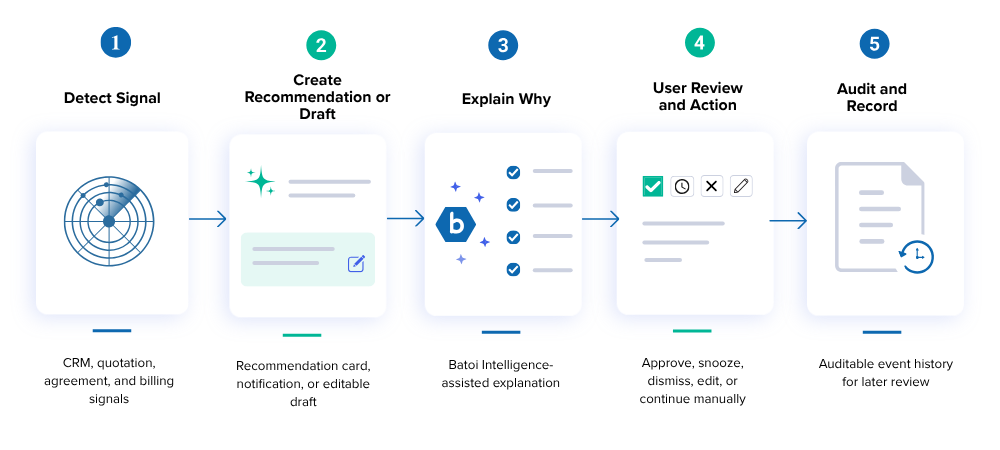
Automation in Batoi Flex does not mean that the system takes business actions independently. Flex follows a controlled automation model:
- Detect a signal from CRM, quotation, agreement, or billing records.
- Create a recommendation, notification, or editable draft output.
- Explain why the recommendation is being shown.
- Let the user approve, snooze, dismiss, edit, or continue manually.
- Keep records auditable for later review.
This keeps the sales process guided without removing the team's business judgment.
Workflow: Deal Update to Recommendation
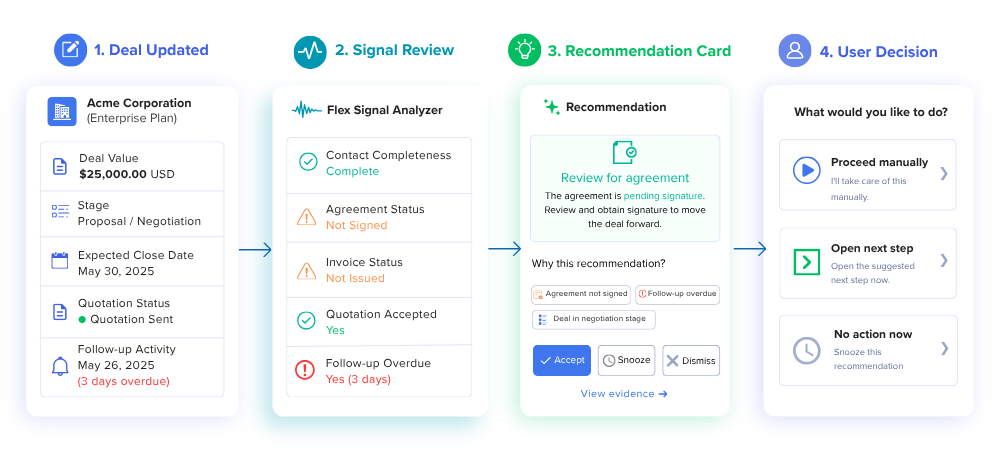
When a user updates a deal or opportunity, Flex reviews structured signals from the sales and billing records. These may include deal value, sales stage, quotation status, expected close date, follow-up activity, contact completeness, agreement status, and invoice status.
If the signal indicates that a next step may be needed, Flex shows a recommendation card on the deal or pipeline view. The card can include the recommended action, supporting evidence, and explanation.
The user can then choose to:
- Accept the recommendation.
- Snooze it for later review.
- Dismiss it.
- Review the evidence.
- Continue manually without changing the record.
This design keeps recommendations useful without making them intrusive. Flex guides the process, but the user decides the action.
Workflow: Agreement Signed to Invoice Readiness
One of the most practical use cases in this release is invoice readiness after an agreement is signed.
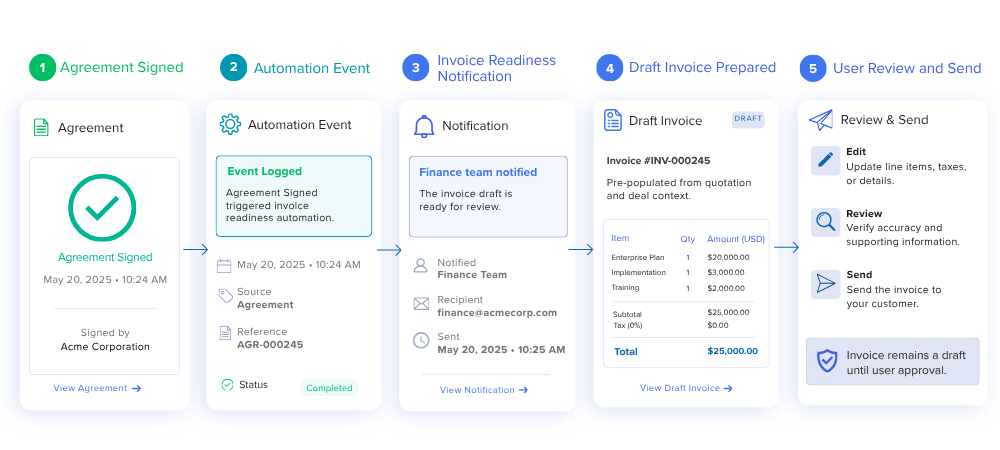
When an agreement is signed, Flex can record an automation event and notify the finance team or responsible user according to workspace rule settings. If invoice preparation is appropriate, Flex can open the invoice creation flow with editable line items pre-populated from the accepted quotation or deal data.
The invoice remains a draft until a user reviews, edits, and sends it.
This makes the handoff from sales to finance faster while remaining controlled. Flex can prepare the draft. The user verifies the details and approves the invoice.
Batoi Intelligence Explanations
Batoi Intelligence can help explain why a recommendation appears. It may indicate that a deal has value, that a quotation has been accepted, that an agreement has been signed, or that no invoice exists yet.
These explanations are stored separately from deterministic rule signals. This distinction is important.
AI-generated text should assist the user without changing source records. Flex does not allow AI output to directly mutate a sales phase, invoice status, payment status, or document status.
This separation supports trust, auditability, and user control. Rules identify the signal. Batoi Intelligence helps explain the signal. Users approve the action.
Administration and Analytics
Workspace administrators can review automation templates, configure rule settings, and monitor analytics. This allows each workspace to start with simple guided recommendations and expand automation only where it fits the operating process.
Analytics help answer practical questions:
- Which recommendations are being accepted?
- Which recommendations are being dismissed?
- Which agreement-signed events are creating invoice readiness?
- Which draft invoices are being converted after review?
- Which rules need adjustment based on user behavior?
This helps administrators tune automation based on actual use, not assumptions.
Packaging and Roadmap
The first release focuses on sales and billing workflows. Advanced recommendations, configurable automation templates, AI explanations, and cross-module automation may be package-gated or offered as add-on capabilities.
Cross-module automation is planned as the next phase after sales and billing usage stabilizes. Candidate areas include:
- Project kickoff recommendations after a won deal.
- Invoice draft recommendations after billable milestones.
- Overdue invoice reminder review.
- Vendor bill payment review.
- Compliance due-date alerts.
- Workforce access review.
This phased approach allows Batoi Flex to expand automation without compromising control, traceability, or workspace-specific configuration.
In Short
Sales Process Automation with Batoi Flex helps users act faster while staying in control. Flex can recommend, explain, notify, and prepare draft outputs. Users still decide, approve, edit, and send. This is automation designed for accountable business operations: guided by software, reviewed by people, and recorded for later audit.