
 Batoi Corporate Office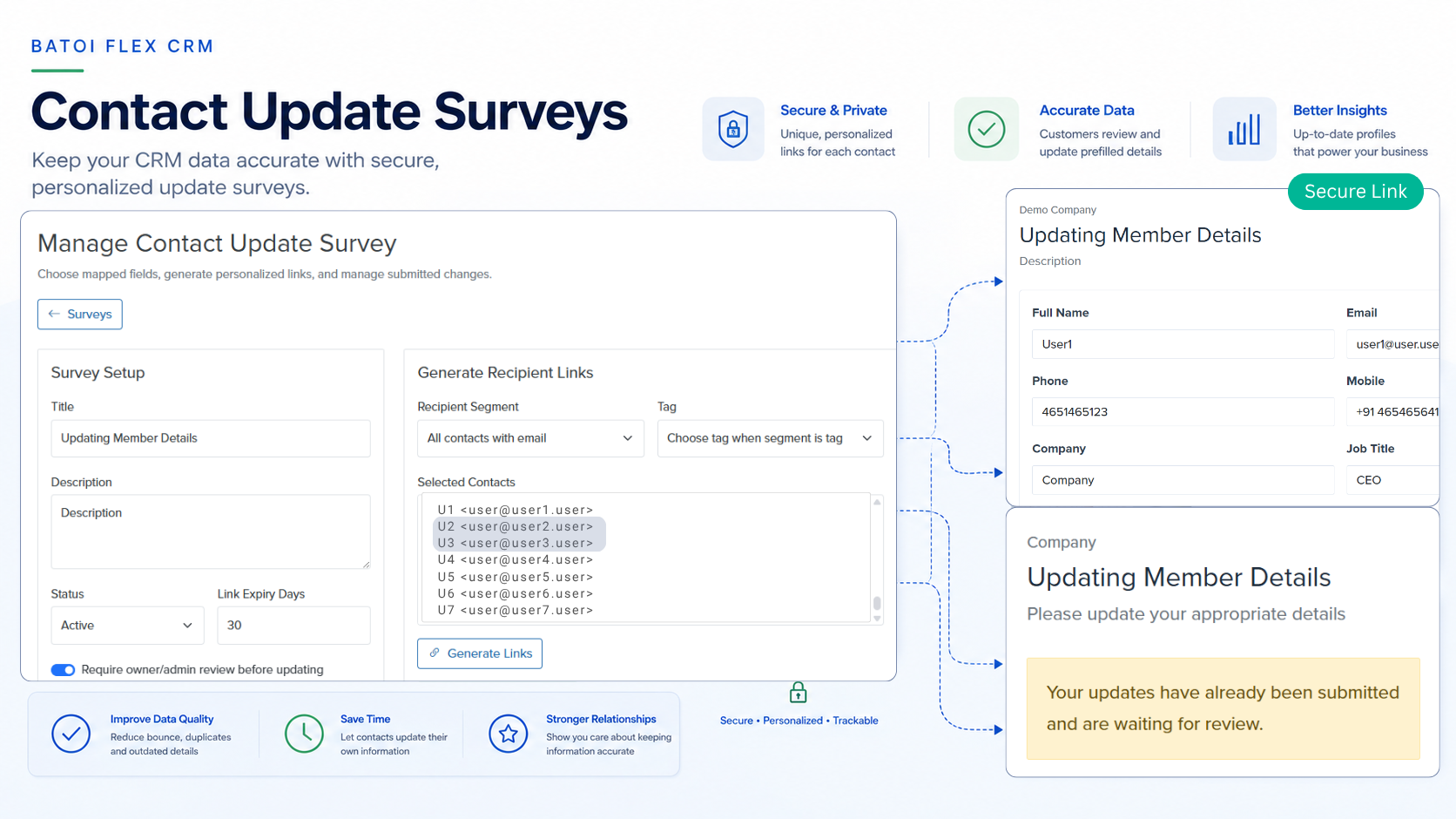
Customer records lose accuracy faster than most teams expect. A person changes role. A phone number stops working. A billing contact moves to another team. A tax field, address, or communication preference becomes outdated. At first these look like small errors, but they soon affect sales follow-up, billing, delivery, compliance, reporting, and customer communication.
Batoi Flex now supports Contact Update Surveys, a CRM workflow that helps workspace teams ask customers, contacts, partners, and members to review their existing information through secure personalized links.
Each recipient receives a private link to a prefilled form. The form is populated from the existing contact record and mapped custom fields. The recipient can confirm the details, correct outdated information, and submit the update. Flex can then either update the CRM record immediately or hold the submitted changes for owner or admin review.
This gives teams a practical way to keep customer records up to date without requiring every customer contact to become a community member or to maintain a separate profile.
Why Customer Data Refresh Matters
CRM data is useful only when teams can trust it.
Sales teams need correct titles, email addresses, phone numbers, and buying roles. Finance teams need accurate billing contacts, tax information, and invoice addresses. Delivery and support teams need the right operational contacts and escalation paths. Compliance and onboarding teams need reliable customer details before they act.
When records are stale, teams spend time manually checking, correcting, and reconciling information. A simple update may travel through email threads, spreadsheets, chat messages, and CRM notes before anyone knows which record is correct.
Contact Update Surveys turn this manual process into a structured workflow.
Instead of asking customers to reply to an email with corrections, teams can send a secure update form tied directly to the CRM contact. The submitted changes are captured, compared, reviewed where required, and written back to the same master record.
What Flex Can Do
The first release of Contact Update Surveys includes:
- CRM-based contact update survey campaigns.
- Mapped standard contact fields and custom contact fields.
- Secure personalized recipient links.
- Prefilled public update forms.
- Recipient status tracking across queued, sent, opened, pending review, submitted, revoked, and expired states.
- Optional review before write-back.
- Field-level change history.
- Archive and restore for survey campaigns.
- Email queue integration through the existing contact engagement worker where configured.
- Analytics for recipients, opens, submissions, and pending review.
The design is intentionally practical. A workspace team can select contacts, choose fields, send an update request, track responses, and act on submitted changes without creating a separate customer portal for each contact.
The Design Principle: Contacts Remain the Master CRM Record
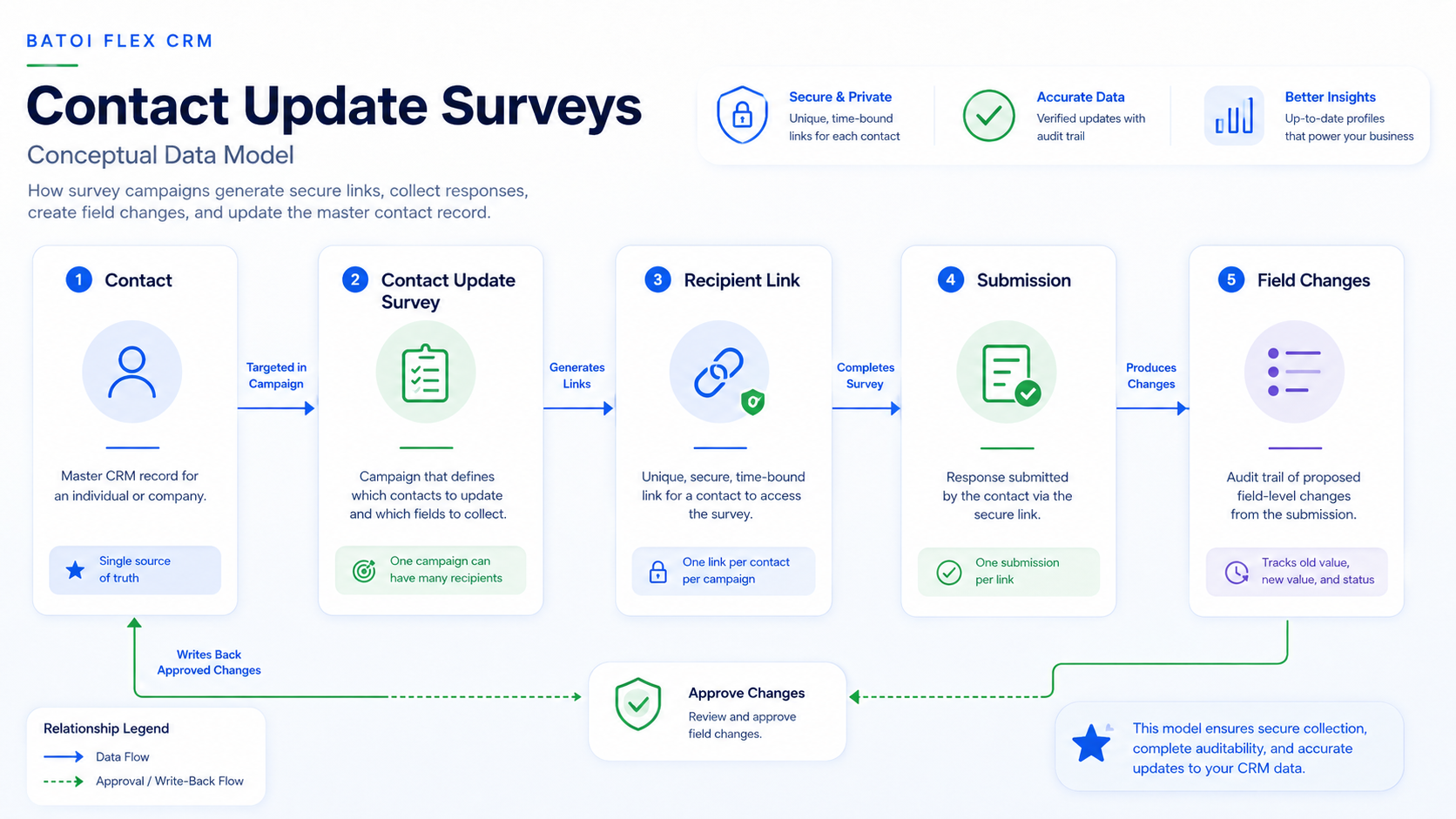
Contact Update Surveys follow one simple rule: the CRM contact remains the master record.
Community membership is useful when a person needs login access, directory visibility, member-only content, networking, learning, or self-service features. It should not be required merely because a business wants a customer to correct CRM data.
Contact Update Surveys solve the data-refresh use case directly:
- Start from the CRM contact record.
- Prefill a form from the contact’s current data.
- Ask the recipient to confirm or correct the information.
- Capture the submitted changes.
- Apply approved changes back to the same contact record.
- Preserve an audit trail of submissions and field-level changes.
This avoids duplicate maintenance. A contact can remain a contact. A member can remain a member. When a person belongs to both, each record can serve its own purpose without making customer data refresh harder than it needs to be.
Common Use Cases
Annual Customer Data Refresh
A workspace owner can send a yearly data verification campaign to all active customer contacts. The form may ask recipients to confirm their email address, phone number, job title, billing address, location, and preferred contact method.
This gives the team a repeatable annual process rather than scattered manual follow-up.
Billing Readiness
Before a renewal cycle or invoice run, the finance team can send a short update survey to confirm billing contact, address, GST, VAT, tax information, purchase order contact, or related custom fields.
This reduces invoice errors and avoids last-minute corrections after billing has already started.
Partner, Member, or Association Records
Associations, partner networks, and community-led businesses often maintain CRM records for many people who do not need full portal access. Contact Update Surveys let those contacts refresh their details without creating duplicate member records.
If a contact is also a community member, the member profile can still exist for member-facing information, visibility, and access.
Delivery and Support Readiness
Before a project kickoff, support handoff, implementation review, or service renewal, the delivery team can confirm technical owner, escalation contact, support location, preferred communication channel, and operational notes.
This helps teams start service work with current information.
Workflow: From Contact Record to Verified Data
A Contact Update Survey follows a clear path:
- A workspace user creates a Contact Update Survey and selects contacts.
- The user chooses which contact fields should appear in the form.
- Flex generates one secure personalized link per contact.
- The survey email is queued or sent where engagement delivery is configured.
- The recipient opens the link and sees a prefilled form.The recipient confirms or updates the information.
- Flex records the submission and field-level differences.
- If review is enabled, an owner or admin approves or rejects the changes.
- Approved changes update the contact and custom contact fields.
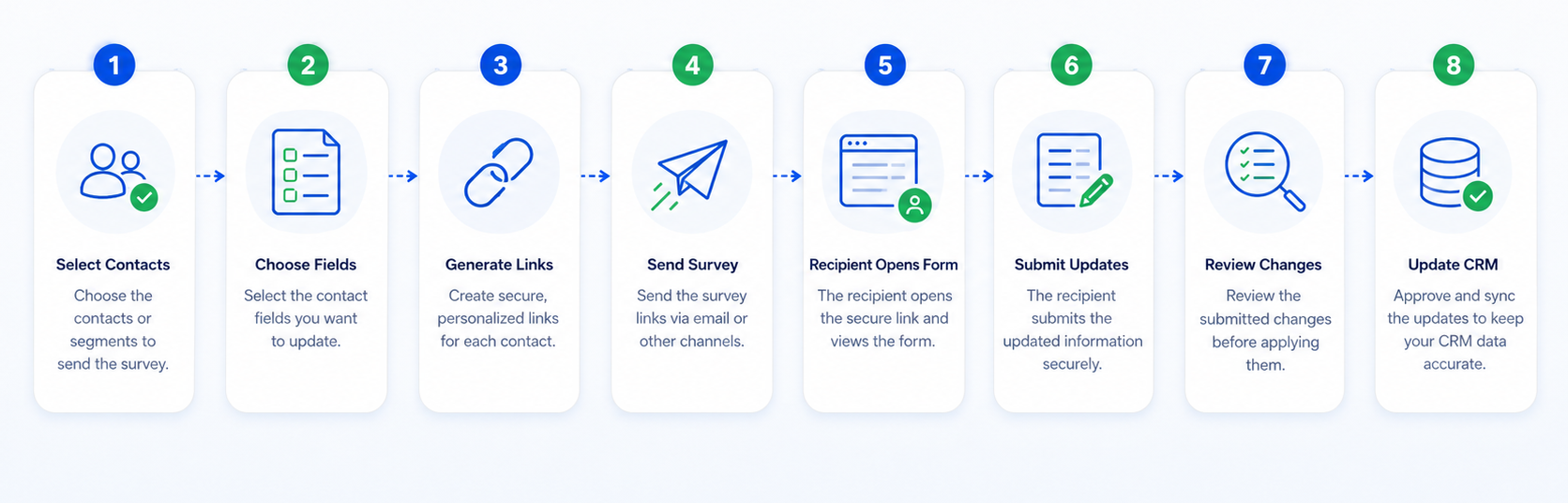
This keeps the process traceable from campaign creation to final CRM update.
Review Mode and Immediate Update
Flex supports two operating modes so teams can match the workflow to the risk level of the data.
Review Required
Review mode is useful for sensitive or business-critical fields, including:
- Email address.
- Billing address.
- Legal or company identity fields.
- Tax and compliance-related custom fields.
- Fields that affect invoices, contracts, service eligibility, or reporting.
In this mode, submitted changes are stored as pending changes. An authorized user reviews the proposed update and then approves or rejects it.
This gives owners and admins control before important data is written back to the CRM.
Immediate Update
Immediate update is useful for low-risk data refresh, including:
- Phone number.
- Job title.
- City or country.
- General communication preferences.
- Operational notes that do not require approval.
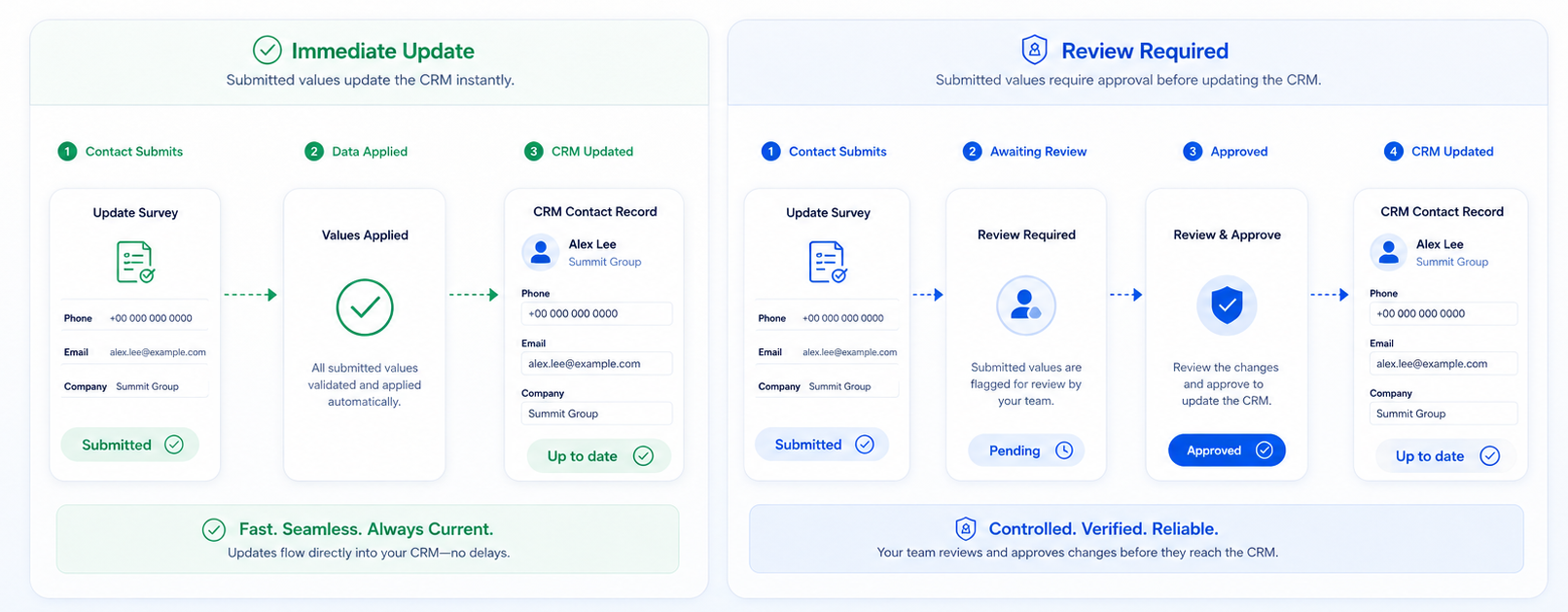
In this mode, the submitted changes are applied to the contact record immediately.
This keeps simple data refresh fast and reduces routine admin effort.
Campaign Operations
Workspace teams can manage the full campaign lifecycle inside Flex. They can create surveys as drafts, activate them when ready, generate recipient links, send update requests, track recipient progress, close old campaigns, and restore archived surveys as drafts when a similar campaign needs to be reused.
Recipient selection can support common operational needs, including:
- All contacts with email addresses.
- Contacts missing phone numbers.
- Tagged contacts.
- Selected contacts.
- Contacts connected to a campaign, segment, customer group, or operational need.
Archived surveys can revoke active recipient links, helping teams cleanly close outdated campaigns.
Analytics and Auditability
Contact Update Surveys are designed for operational follow-through. Teams can track recipients, opens, submissions, pending reviews, expired links, and revoked links. This helps owners see whether a refresh campaign is working and where follow-up may be needed.
The field-level change history is especially important. It allows teams to see what changed, what was submitted, and whether the change was applied immediately or approved after review.
For data that affects billing, compliance, onboarding, or reporting, this audit trail gives the business a clearer record of how customer information was updated.
Practical Benefits
Contact Update Surveys help teams:
- Improve CRM data quality.
- Reduce manual follow-up.
- Avoid duplicate contact and member maintenance.
- Keep customer information tied to one master CRM record.
- Preserve auditability for important data changes.
- Improve segmentation, billing, communication, and delivery readiness.
- Give customers a simple way to confirm or correct their own information.
The feature has a small surface area but is useful across many business functions. Sales, finance, delivery, support, partner teams, and workspace owners all benefit when CRM records stay up to date.
In Short
Contact Update Surveys give Batoi Flex users a controlled way to refresh customer data directly from the CRM. The workflow keeps contacts as the source of truth, avoids unnecessary member duplication, and gives businesses a repeatable process for maintaining reliable customer records.
With secure personalized links, prefilled forms, optional review, field-level history, and campaign analytics, Batoi Flex helps teams move customer data refresh from manual email follow-up to a structured, auditable CRM workflow.